
Issues & Recommendations
Heading Structure
| Level | Heading | Position |
|---|
Duplicate Headings
This tool evaluates heading structure in the HTML you provide. A well-ordered hierarchy can improve document organization and accessibility, but heading checks alone do not determine search rankings.
SEO Heading Analyzer
Check Your H1–H6 Heading Structure
Headings do more than divide a page into sections. They help readers understand how information is organized and give search engines additional context about the structure of a document.
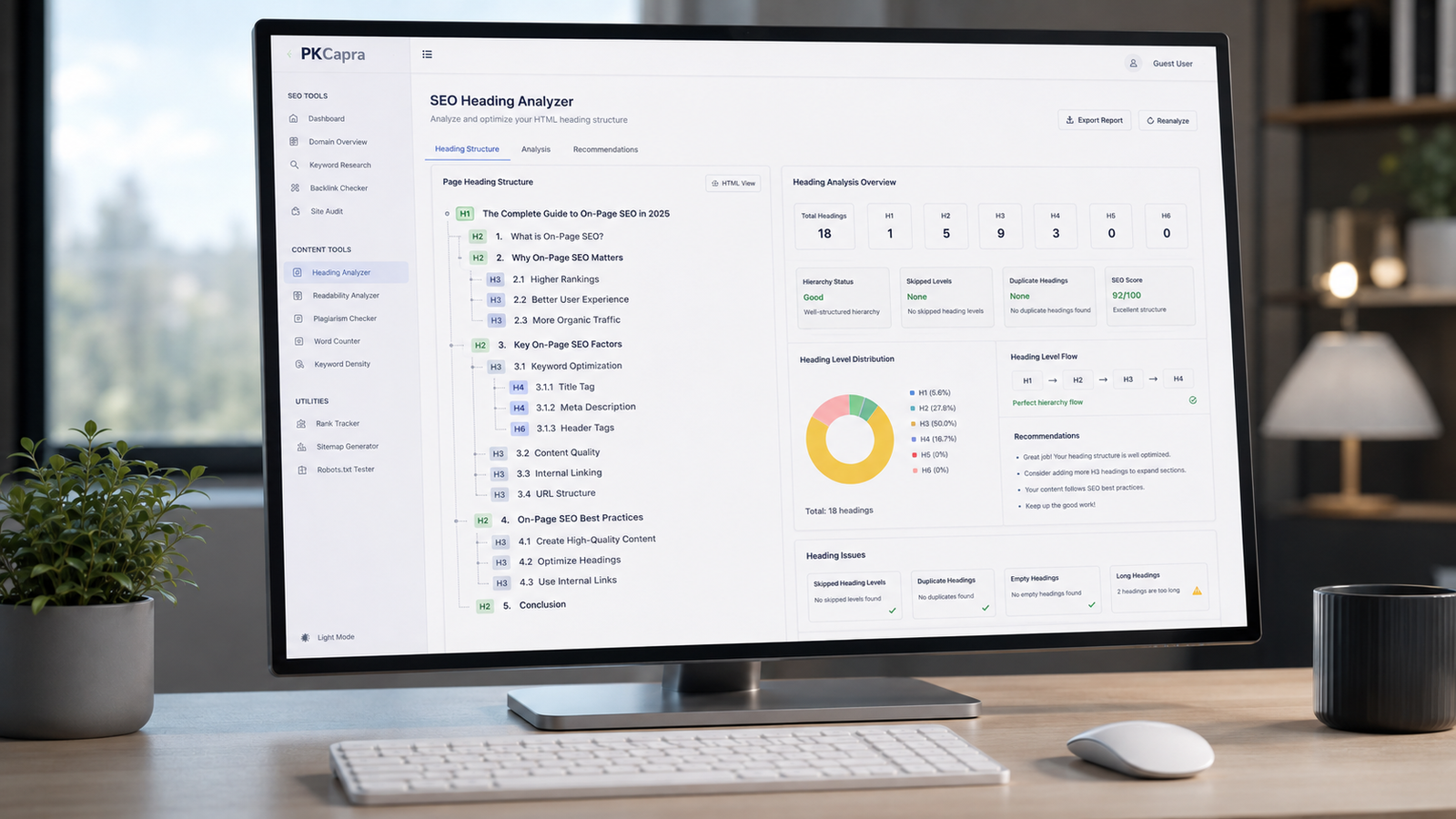
The PKCapra SEO Heading Analyzer helps you inspect the heading structure of an HTML page quickly. Paste your page HTML into the tool and review your H1, H2, H3, H4, H5, and H6 headings in an organized report.
The analyzer can identify missing or multiple H1 headings, skipped heading levels, empty headings, unusually long headings, repeated heading text, and other structural issues worth reviewing.
Paste your HTML above and select Analyze Headings to get started.
What Is an SEO Heading Analyzer?
An SEO heading analyzer is a tool that examines the heading structure of a webpage.
HTML headings range from H1 through H6. They provide a hierarchy that helps organize the content of a document.
For example:
- H1 can represent the main subject of a page.
- H2 headings can introduce major sections.
- H3 headings can organize subsections within an H2 section.
- H4–H6 can provide additional levels when the content genuinely requires them.
A good heading structure should make sense to a person reading the page, not simply satisfy an automated checklist.
The PKCapra analyzer gives you a quick structural view so you can find areas that deserve a closer look.
Why Are Headings Important for SEO?
Well-structured headings can make a long page easier to understand and navigate.
They help readers scan a page before deciding which sections to read. They can also provide useful structural context about the content.
However, headings should not be treated as a place to repeatedly insert keywords.
Google recommends creating helpful, reliable, people-first content rather than content designed primarily to manipulate search rankings.
That means your headings should describe the sections accurately and naturally.
A useful heading is one that tells the reader what they are about to find.
What Does the PKCapra SEO Heading Analyzer Check?
The tool reviews the H1–H6 headings detected in the HTML you provide.
H1 Count
The analyzer shows how many H1 headings were detected.
It can identify pages with no H1 and pages containing multiple H1 elements so you can review whether the structure makes sense.
There is no reason to force an H1 into every possible component of a page. The important question is whether the document has a clear primary heading structure.
H2–H6 Counts
The tool displays the number of headings at every level from H1 through H6.
This gives you an immediate overview of how the page is organized.
For example, a long article might contain one H1 followed by several H2 sections, with H3 headings used for related subsections.
Heading Hierarchy
The analyzer checks the order in which heading levels appear.
A common structural problem is jumping from one heading level to a much deeper level without an appropriate parent section.
For example:
H1 → H2 → H3
is generally easier to understand structurally than:
H1 → H4
when the H4 is being used as though H2 and H3 sections existed above it.
The analyzer flags skipped levels so you can review them.
Empty Headings
An empty heading provides no useful information to a reader.
The tool checks for headings without meaningful text and identifies them in the recommendations.
An empty heading may result from an editing mistake, a theme component, or an HTML element that was left behind during page editing.
Long Headings
Long headings are not automatically bad.
Sometimes a detailed heading accurately describes the section that follows.
However, an unusually long heading can be difficult to scan. The analyzer identifies very long headings so you can decide whether they can be made more concise without losing meaning.
Duplicate Headings
Repeated headings can be intentional, particularly on templates or pages containing repeated components.
Nevertheless, duplicate heading text can sometimes indicate that sections were copied without being properly customized.
The tool lists repeated heading text so you can review those occurrences.
Complete Heading Structure
The analyzer displays the detected headings in their original order.
This makes it easier to see the page’s hierarchy at a glance rather than checking every heading manually inside the source code.
How to Use the SEO Heading Analyzer
Step 1: Copy Your HTML
Copy the HTML source of the page or the relevant HTML content you want to inspect.
Step 2: Paste It Into the Tool
Place the HTML into the analyzer’s input field.
Step 3: Analyze Headings
Click Analyze Headings.
The tool processes the HTML directly in your browser and generates the heading report.
Step 4: Review the Structure
Check the heading counts, hierarchy, repeated headings, empty headings, and recommendations.
Step 5: Fix Real Problems
Return to your website editor and make changes only where they improve the page’s organization or user experience.
Then run the page through the analyzer again.
What Is a Good SEO Heading Structure?
There is no universal heading template that every webpage must follow.
A sensible structure depends on the type and depth of the content.
For a detailed article, a structure such as this may work well:
H1: Complete Guide to Technical SEO
H2: What Is Technical SEO?
H2: Why Technical SEO Matters
H3: Crawlability
H3: Indexability
H2: Technical SEO Checklist
H3: XML Sitemaps
H3: Robots.txt
The hierarchy reflects the relationship between the topics.
The important part is not the exact number of headings. It is whether the structure accurately represents the information on the page.
Should a Page Have Only One H1?
A clear primary H1 is generally a sensible structure for many pages because it communicates the main subject of the document.
However, heading implementation can vary depending on the page, HTML structure, CMS, and components involved.
The PKCapra analyzer does not simply tell you that every multiple-H1 situation is automatically a ranking problem.
Instead, it shows the H1 count and lets you inspect the structure.
Focus on creating a clear document hierarchy rather than chasing an arbitrary number.
Can You Use Keywords in Headings?
Yes, when they naturally describe the section.
If a section genuinely discusses “Technical SEO Audit,” using that phrase as the heading can help both readers and search engines understand the section.
What you should avoid is inserting the same keyword into every heading simply because you want to increase keyword frequency.
For example, this is unnatural:
- SEO Tools
- Best SEO Tools
- SEO Tools Features
- SEO Tools Benefits
- SEO Tools Guide
- SEO Tools Information
Better headings describe what each section actually contains.
Natural language and useful organization should come first.
Should H2 Come Before H3?
In a conventional hierarchical structure, an H3 normally belongs beneath an H2 section.
For example:
H1 → H2 → H3
This relationship makes the document easier to understand.
If a page moves from H1 directly to H3, review whether an H2 parent section is missing.
The analyzer flags skipped levels as something worth investigating.
Do Heading Levels Affect Google Rankings?
Heading structure is useful for organizing content, but there is no magic heading formula that guarantees higher rankings.
SEO involves much more than heading levels.
Search performance can depend on factors including how well the page satisfies search intent, the usefulness and reliability of the content, technical accessibility, internal linking, and many other signals.
Therefore, do not change a logically structured page solely to create a particular heading pattern.
Improve the structure when it makes the content clearer.
SEO Headings vs. Keyword Stuffing
A heading should tell the reader what the section is about.
It should not exist primarily to repeat a target keyword.
For example, if you are writing about website indexing, headings such as these may be useful:
How Website Indexing Works
Common Indexing Problems
How to Check Indexability
Each heading describes a distinct section.
Repeating the same keyword phrase across every heading would add little value and could make the page feel unnatural.
Heading Structure and Accessibility
Clear heading hierarchy can also make content easier to navigate for people using assistive technologies.
A logical hierarchy gives readers a structural map of the page.
That is another reason to think about headings as part of document organization rather than treating them only as an SEO technique.
SEO improvements and accessibility improvements can often support the same basic goal: making information easier to understand and navigate.
Common Heading Problems to Check
Missing H1
If the page has no clear primary heading, review the page structure and determine whether an H1 is needed.
Multiple H1 Headings
Multiple H1 elements may deserve investigation, particularly when they are being used for unrelated page sections rather than representing the document’s primary topic.
Skipped Heading Levels
A jump such as H2 to H4 may indicate that the hierarchy needs review.
Empty Headings
Remove empty headings when they do not serve a meaningful structural purpose.
Overly Long Headings
Shorten headings when they can communicate the same idea more clearly.
Repeated Headings
Check whether duplicate headings are intentional or the result of copied content or template issues.
Decorative Text Marked as a Heading
Not every large or bold piece of text needs to be an HTML heading.
Use heading elements for actual sections and subsections.
How to Improve Your Heading Structure
Start by identifying the main subject of the page.
That subject should be represented clearly at the top level.
Next, divide the content into major sections.
Use H2 headings for those major sections and introduce H3 headings when a section contains meaningful subsections.
Only use deeper heading levels when the content actually needs them.
Finally, read the headings alone from top to bottom.
If someone could understand the basic organization of the page just by reading the headings, the structure is probably doing its job.
A Simple Heading Audit Checklist
Before publishing or updating a page, check:
- Is the main subject represented clearly?
- Is there an appropriate primary heading?
- Are major sections separated logically?
- Are H3 headings actually part of an H2 section?
- Are heading levels being skipped unnecessarily?
- Are any headings empty?
- Are headings excessively long?
- Are duplicate headings intentional?
- Do headings accurately describe the content beneath them?
- Are keywords used naturally rather than repeatedly?
- Does the hierarchy make sense when headings are read without the body copy?
SEO Heading Analyzer for Content Audits
The tool can also be useful when auditing an existing website.
Large websites often accumulate structural inconsistencies over time.
Pages may be created by different writers, developers, agencies, or CMS templates. As content changes, heading structures can become inconsistent.
Running important pages through a heading analyzer can help identify patterns that deserve attention.
For a broader technical review, you can also use the PKCapra Indexability & Crawlability Analyzer.
If you are reviewing internal navigation and crawl paths, use the PKCapra Internal Links & Crawl Path Analyzer.
For structured data checks, use the PKCapra Schema Markup & Structured Data Analyzer.
How Often Should You Check Heading Structure?
There is no need to analyze every page every day.
A heading audit is particularly useful when:
- Publishing a new important page
- Updating a large article
- Migrating a website
- Changing a WordPress theme
- Rebuilding templates
- Consolidating content
- Performing a technical SEO audit
- Reviewing pages created by multiple contributors
For large websites, you can prioritize important landing pages, category pages, guides, and pages receiving significant organic traffic.
Is the PKCapra SEO Heading Analyzer Free?
Yes. The PKCapra SEO Heading Analyzer is designed as a free online tool for checking webpage heading structure.
You can paste HTML into the analyzer and review the detected H1–H6 structure without manually inspecting every heading in the source.
Does the Analyzer Change My Website?
No.
The tool analyzes the HTML you provide and reports its findings.
It does not automatically edit your website, rewrite your headings, or change your page source.
You remain in control of every change.
Does the Tool Guarantee Better Rankings?
No.
No heading analyzer can guarantee improved Google rankings.
The purpose of this tool is to help you identify structural issues and make more informed editing decisions.
Search optimization should focus on creating useful pages that satisfy users rather than manipulating individual metrics.
A Better Way to Think About SEO Headings
The strongest heading structure is not the one that produces the most impressive-looking SEO report.
It is the structure that helps someone understand the page.
Before optimizing a heading for a search phrase, ask:
Does this heading accurately tell the reader what they will find below it?
If the answer is yes, you are already solving the most important problem.
Use SEO terminology where it fits naturally. Keep headings specific. Organize related information together. Avoid unnecessary repetition.
Analyze Your Headings Before You Publish
A few minutes of structural checking can reveal problems that are easy to miss while writing or editing.
Use the PKCapra SEO Heading Analyzer to inspect your H1–H6 structure, identify potential hierarchy issues, find empty or repeated headings, and review the organization of your page.
Analyze your headings, improve the structure, and make your content easier to navigate.